PlayStation 2 on PC, done right
Clear setup, BIOS context, and performance tuning—so you spend less time searching and more time in-game. Installers are not hosted on pcsx2.dev; Get PCSX2 opens an external download link—use the download guide to verify builds and official sources.
Trusted builds: Download guide
- Platforms
- Win · Linux
- This site
- Guide only
- Cost
- Free
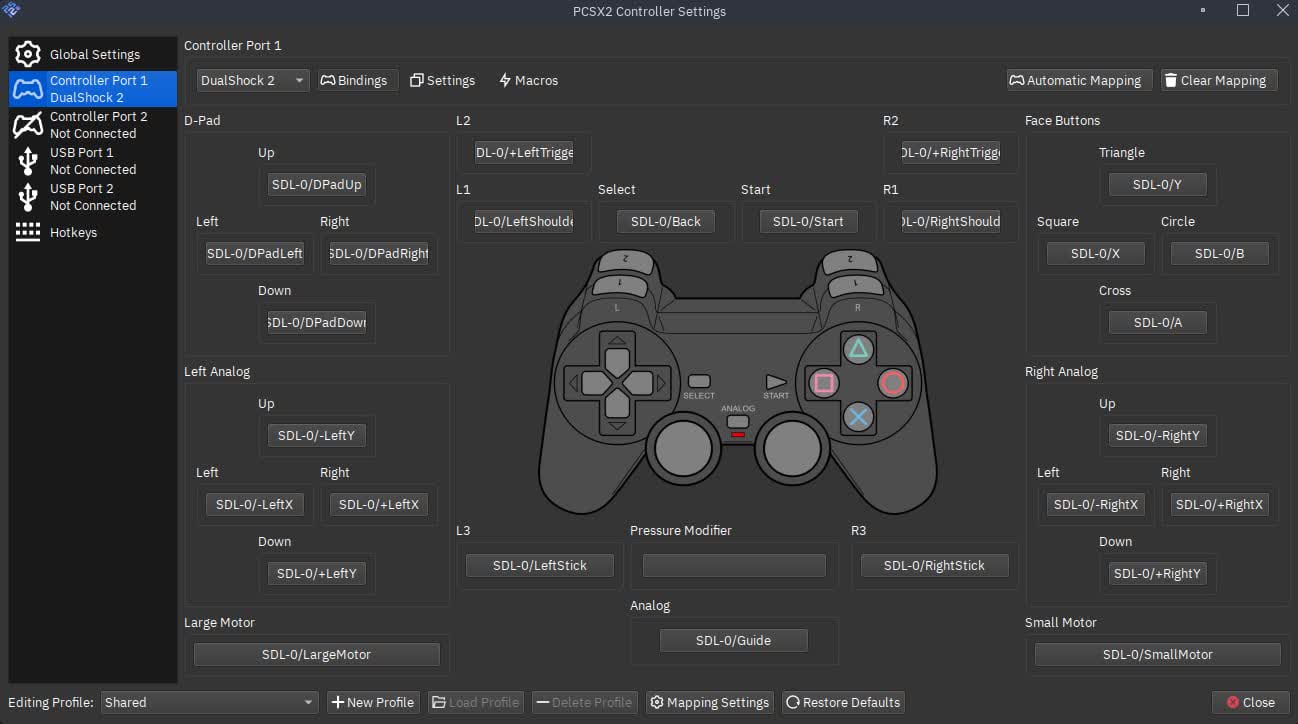
Controller settings
Product
Everything you need to go from install to play
Structured guides—dense when you need answers fast, light when you’re browsing.
-
Setup & BIOS
First launch, plugins, and BIOS context—aligned with common best practices.
Open setup -
Performance
Renderers, upscaling, frame pacing—when to push quality vs. speed.
Tune performance -
Troubleshooting
Crashes, graphics oddities, and how to report issues usefully.
Get unstuck -
Safe downloads
Trusted channels and what to avoid in repacks.
Download help -
FAQ
Legality, hardware expectations, and where help lives.
Read FAQ -
Project links
Compatibility DB, forums, and project channels.
Browse links
Trust
Built for clarity—not noise
Open source, publicly documented, continuously improved. This guide routes you to primary sources—fast.
- Primary sources first — published builds and release notes for builds and news.
- No installers on this domain — static pages; primary download buttons link out externally.
- Grounded in real issues — troubleshooting reflects common failures.
100%
Free & open
2
Desktop platforms
11+
Guide pages
“Finally a guide that doesn’t funnel you to random mirrors. Straight to trusted sources.”
“Performance section saved me from chasing the wrong renderer for hours.”
“Clear and useful next to the wiki.”
About
A companion guide—not the PCSX2 team
PCSX2 is a help site for players. We don’t ship binaries—use our download guide and resources for builds and documentation links.
Less searching—more time in-game.
Ready
Install PCSX2 the right way
Grab a stable build—then use this guide to configure and tune.
Explore
Every guide page on this site
Jump to depth when you need it—skim when you don’t.
Quick answers
- Do I need a BIOS file?
- Yes—PCSX2 requires a legal BIOS dump from a console you own. The guide explains context without hosting files.
- Windows or Linux?
- Both are supported. Pick the build that matches your OS and update GPU drivers before heavy testing.
- Why is my game slow?
- Often renderer choice, internal resolution, or CPU limits. Start with the Performance page, then narrow in Help.
- Vulkan or OpenGL?
- Many GPUs run well on Vulkan; OpenGL remains useful for compatibility edge cases. Swap if you see glitches.
- Where do saves live?
- Memory cards and save states are stored under your PCSX2 user folder—paths differ slightly by OS; the setup guide walks through locating them.
First-run checklist
A practical order that avoids circular tweaking.
- 1Install from a trusted channel and verify checksums when offered.
- 2Place BIOS where PCSX2 expects it and confirm the path in settings.
- 3Map controllers and test deadzones before long sessions.
- 4Pick a renderer, set internal resolution conservatively, then iterate.
- 5Enable automatic updates for GPU drivers on a stable branch.
- 6Capture emulog when reporting a crash—saves back-and-forth.
- 7Back up memory cards before experimenting with hacks.
Renderer snapshot
Rule-of-thumb only—titles vary.
| Topic | Vulkan | OpenGL |
|---|---|---|
| Typical performance | Often strong on modern GPUs | Solid on many setups |
| Driver sensitivity | Keep drivers current | Same advice |
| When to try the other | Odd blending or crashes | Missing effects on some titles |
| Upscaling | Usually flexible | Usually flexible |
Words you’ll see everywhere
EE / IOP
CPU subsystems; timing issues can show up as audio or physics glitches.
VU
Vector units; some hacks target VU behavior for specific games.
GS
Graphics synthesizer path—where upscaling and blending matter most.
GameDB
Database of per-title fixes PCSX2 can apply automatically.
Emulog
Text log of what the emulator did—attach it when asking for help.
Save state
Instant snapshot—great for practice, not a substitute for memory cards.
Internal resolution
Rendered resolution—higher looks sharper, costs GPU time.
Frame limiter
Keeps pacing near console speed; turn off only when diagnosing.
Short notes from the guides
“Start conservative with upscaling—confirm full speed, then add quality.”
“If FMVs stutter, separate audio sync from frame pacing before blaming the CPU.”
“Map hotkeys you’ll actually use—fewer accidental state loads mid-boss.”
- Static site
- No telemetry
- English
- Player-focused
- Portable tips
- Linux & Windows
Choose a lane
Pick your path through the guides
Same site—different entry points depending on where you are.
First install
Brand new
- Download → Setup → BIOS path
- One game, default settings, confirm full speed
- Requirements if something feels off
Returning
Upgrading or reinstalling
- Back up saves and memcards before swapping folders
- FAQ for portable vs. fixed installs
- Troubleshooting if a build regresses
Power user
Tuning & edge cases
- Performance for renderers & hacks
- GameDB + per-title threads for oddities
- Resources for compatibility DB
30-second preflight
Quick checks before you blame the emulator.
- 1GPU driver updated (stable branch)
- 2Power plan: high performance on laptops
- 3Close overlays (FPS, recording) while testing
- 4Confirm BIOS region matches your dumps
- 5Test windowed first, then fullscreen
- 6Note PCSX2 version in any bug report
Common traps vs. better moves
Often hurts
- Max upscaling before confirming full FPS
- Stacking hacks without a baseline
- Old BIOS dumps from unknown sources
- Ignoring thermal limits on thin laptops
Usually helps
- Change one variable at a time
- Trust GameDB defaults, then adjust
- Keep memcard backups on long RPGs
- Attach emulog + version when asking for help
Hardware in plain terms
Rough expectations—demanding titles still exist.
CPU
Single-thread muscle matters; more cores help OS & background tasks.
GPU
Upscaling & blending load scales with internal resolution.
RAM
Headroom avoids stutter when the OS caches aggressively.
Storage
Fast SSD improves load times; ISO format choice is personal.
Audio & sync cues
When sound is “off,” it’s often pacing—not always “bad audio.”
- Crackling under load
- Try frame limiter settings and reduce GPU-bound effects first.
- FMVs out of sync
- Test another renderer; some titles are picky about sync modes.
- Muted briefly on tab focus
- Check OS mixer and exclusive fullscreen behavior.
Symptom → try
| Sign | First knob |
|---|---|
| Stuttery music | FPS headroom, limiter |
| Choppy voice | CPU load, other apps |
| Delayed SFX | Renderer swap test |
Your first hour (suggested order)
Install & launch
Point BIOS, confirm no boot errors. Setup guide
Controller pass
Map face buttons + analog; verify diagonals.
Baseline graphics
Native or modest upscale; pick Vulkan or OpenGL and stick for 15 minutes.
One full level
Watch for shader stutter on first run—often normal.
Tune or document
If issues remain, capture symptoms + troubleshooting.
More terms (quick)
Compatibility
Not every PS2 title behaves the same
Some games need specific fixes; others run out of the box. Use the compatibility database and per-game notes before turning every hack on. Screenshots and stories on this site are illustrative—your mileage varies by hardware and build.
When to dig deeper
- •Black screen after logo → renderer / GameDB entry
- •Random hangs → log, version, reproduce steps
- •Wrong aspect → widescreen vs. native, per-title
Useful bug reports (short list)
Helps maintainers reproduce faster—whether you post on forums or issue trackers.
- 1PCSX2 version + OS + GPU driver string
- 2Game serial / region if known
- 3Steps from cold launch to crash
- 4Settings that differ from defaults
- 5Emulog snippet (not the whole novel)
- 6Last known good build if a regression
Where to read next
One-line pointers—same pages as above, different angles.
- DownloadChannels, verification, what to avoid
- SetupFirst launch, paths, controllers
- PerformanceQuality vs. speed trade-offs
- TroubleshootingCrashes, graphics oddities, logs
- FAQLegality, expectations, basics
- StoriesPlayer perspectives (illustrative)
Graphics pipeline (mental model)
Rough flow—helps you guess what to tweak when something looks wrong.
If only FMVs break, suspect sync or decode paths before rewriting global graphics settings.
ISO file vs. physical disc
| Topic | ISO / file | Disc |
|---|---|---|
| Seek noise | None | Depends on drive |
| Load consistency | Usually steady | Can vary |
| Portability | Easy backup | Needs drive access |
| Legality | Dump media you own; this site doesn’t host games. | |
Healthy play sessions
- Save to memcard at natural checkpoints—not only save states.
- After driver or PCSX2 updates, test one known-good title first.
- Keep a text file with “per-game” settings if you swap hacks often.
- Restart the emulator after large setting changes; fewer ghost issues.
Netplay / online
PCSX2’s focus is offline play. Online features depend on project state and community tools—check official channels for what’s supported in your build.
Hotkeys worth mapping early
Exact labels vary by version—use in-app search in settings. Setup
Windows vs. Linux (high level)
Windows
- • Wide driver coverage; update from GPU vendor
- • Watch for fullscreen exclusive vs. borderless behavior
- • Antivirus can slow first launch; allow folder if trusted
Linux
- • Mesa vs. proprietary drivers—both can work; pick what your distro supports
- • Wayland vs. X11 may change input or fullscreen—note your session
- • Package installs vs. AppImage—permissions differ for paths
Genre-shaped expectations
Not rules—patterns people notice when tuning.
RPG / long runs
Stability > peak FPS; memcard backups matter.
Racing / twitch
Input latency and consistent frame pacing show up fast.
FMV-heavy
Sync and decoder quirks—test small setting deltas.
At-a-glance numbers
PS2
Target platform
2
Desktop OS guides
11+
Site pages
0
Installers hosted here
Suggested reading order (new visitors)
- Requirements — sanity-check hardware
- Download — get a build safely
- Setup — BIOS, controllers, first boot
- Performance — only after baseline works
- Troubleshooting — when something breaks
- FAQ — common policy questions
Extra quick questions
Can I use a DualSense or Xbox controller? ▸
Usually yes via OS drivers or SDL—map in PCSX2 and test analog range.
Does upscaling fix jaggies everywhere? ▸
Often yes on 3D; 2D elements and FMVs may need different handling per game.
Should I enable every speedhack? ▸
No—start from defaults + GameDB, then add one change at a time.
Where is the wiki mentioned? ▸
See Resources for official documentation links.
Backups checklist
- Memory card files (.ps2)
- Save-state folder (if you rely on it)
- Per-game settings notes
- Screenshots of graphics pages before experiments
Legality (reminder)
You need a BIOS dump from hardware you own. Game dumps must come from discs you own. This guide doesn’t provide copyrighted files.
Read FAQ →Mixed notes
Controller
D-input, X-input, and SDL paths behave differently—if inputs feel “heavy,” try another backend after checking OS calibration.
Shader cache
First minutes can hitch; don’t judge stability on minute one.
Updates
Read release notes when jumping many versions.
Features tour
See Features for emulator capabilities at a glance—then cross-check with your build.